

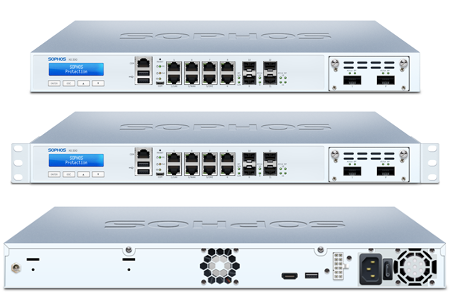
A firewall is a crucial component of any small and medium-sized enterprise (SME) network security infrastructure. A firewall acts as a barrier between the internet and the internal network, protecting against unauthorized access, malware, and other cyber threats. In order to understand the best firewall for your business, we’ve produced this blog to assist you in finding the most suitable firewall for your business.
Implementing a well-configured firewall within an SME involves several steps. First, the SME must assess its network security needs and identify potential threats. This assessment should be used to inform the selection of an appropriate firewall solution. The firewall should be properly configured to match the needs of the organization and to maximize its effectiveness. It is also important to ensure that the firewall is kept up to date with the latest security patches and firmware updates.
There are numerous firewall vendors in the market, but some of the market leaders include:
- Cisco
- Fortinet
- Sophos
- WatchGuard Technologies
- Palo Alto Networks
- Check Point Software Technologies
Not implementing a robust firewall solution can have severe consequences for SMEs. Without a firewall, an organization’s internal network is vulnerable to unauthorized access, data breaches, and malware attacks. This can lead to data theft, loss of customer confidence, financial loss, and even legal liability. In addition, a lack of network security can negatively impact an organization’s productivity and reputation. Therefore, SMEs must prioritize the implementation of a secure and well-configured firewall to protect their networks and assets from cyber threats.
The current digital landscape is rapidly evolving, and cybersecurity threats are becoming more sophisticated, making it critical for small and medium-sized enterprises (SMEs) to prioritize their network security. According to a report by Verizon, 43% of cyber-attacks target small businesses, with 60% of SMEs going out of business within six months of a cyber-attack. These statistics are alarming, and they emphasize the need for SMEs to invest in robust cybersecurity solutions, including a well-configured firewall.
What is a Firewall, and how does it work?
A firewall is a network security device that monitors and filters incoming and outgoing network traffic based on predetermined security rules. It acts as a barrier between the internal network and the internet, preventing unauthorized access to the network and blocking malicious traffic. Firewalls work by examining the data packets that are sent and received over the network and deciding whether to allow or block them based on the rules set by the network administrator.
Types of Firewalls
There are two main types of firewalls: hardware and software firewalls.
Hardware Firewalls: These are standalone devices that are placed between the network and the internet. They are typically more robust and offer better performance than software firewalls. Hardware firewalls can be customized to suit the needs of an organization, and they can be configured to block traffic based on application, protocol, or port number.
Software Firewalls: These are installed on individual computers or servers within the network. They offer basic protection against cyber threats and are often included as part of an operating system. Software firewalls are easy to install and configure, but they may not provide adequate protection against sophisticated attacks.
How to Implement a Well-Configured Firewall within an SME
Implementing a well-configured firewall within an SME requires careful planning and execution. Here are the steps that SMEs should follow:
- Assess the Network Security Needs: SMEs must evaluate their network security needs and identify potential threats. This assessment should be used to inform the selection of an appropriate firewall solution.
- Choose a Firewall Solution: There are numerous firewall vendors in the market, but SMEs should choose a solution that meets their specific needs. They should consider factors such as cost, ease of use, scalability, and support when selecting a firewall solution.
- Configure the Firewall: Once the firewall solution has been selected, SMEs should configure it to match the needs of the organization. The firewall should be configured to block all traffic that is not explicitly allowed, and it should be set up to log all traffic.
- Keep the Firewall Up to Date: It is essential to keep the firewall up to date with the latest security patches and firmware updates. This will ensure that the firewall remains effective against the latest cyber threats.
Available Firewall Vendors
As mentioned earlier, there are numerous firewall vendors in the market. Here are some of the market leaders:
- Cisco: Cisco is a leading provider of networking and cybersecurity solutions. Its firewall solutions are scalable, reliable, and easy to manage.
- Fortinet: Fortinet offers a range of network security solutions, including firewalls, VPNs, and intrusion detection systems. Its firewall solutions are designed to provide advanced threat protection for SMEs.
- Sophos: Sophos is a global leader in network and endpoint security. Its firewall solutions are designed to provide advanced threat protection, including next-generation firewalls that offer features such as intrusion prevention, advanced threat detection, and content filtering.
- WatchGuard Technologies: WatchGuard offers a range of firewall solutions, including next-generation firewalls, unified threat management (UTM) firewalls, and virtual firewalls. Its solutions are designed to provide comprehensive network security for SMEs, with features such as intrusion prevention, malware detection, and content filtering.
Consequences of Not Implementing a Robust Firewall Solution
Not implementing a robust firewall solution can have severe consequences for SMEs. Without a firewall, an organization’s internal network is vulnerable to unauthorized access, data breaches, and malware attacks.
Unauthorized Access: Hackers can gain unauthorized access to an SME’s network and steal sensitive information such as customer data, financial information, and intellectual property. This can result in significant financial loss, damage to the SME’s reputation, and potential legal liability.
Data Breaches: Data breaches occur when sensitive information is exposed to unauthorized parties. SMEs that experience data breaches can suffer significant financial losses, damage to their reputation, and loss of customer trust. The cost of remediation, such as notifying customers, offering credit monitoring services, and legal fees, can also be substantial.
Malware Attacks: Malware attacks can take many forms, including viruses, worms, and ransomware. These attacks can cause significant damage to an SME’s network, resulting in lost data, disrupted operations, and financial losses.
Productivity Loss: Network security issues can also negatively impact an organization’s productivity. When employees are unable to access critical systems or data, their ability to work effectively is diminished, resulting in lost productivity and revenue.
In conclusion, SMEs must prioritize the implementation of a secure and well-configured firewall to protect their networks and assets from cyber threats. Choosing an appropriate firewall solution and keeping it up to date is crucial to ensure that SMEs can detect and prevent unauthorized access, data breaches, and malware attacks. Failure to implement a robust firewall solution can have significant consequences for SMEs, including financial loss, damage to reputation, and potential legal liability.